
I finally have taken a bite out of the apple. I bought an iPhone XR, betraying my commitment to simplified tech. I had several reasons for doing so: 1) Wifi connections are too unreliable at RV parks, where I shall be doing work for Cold Hard Type this summer; 2) I now can do work at airports that lack free or secure wifi; 3) I need to text well when I coordinate the annual wRites of Spring Literary Festival at my college; and 4) For emergencies like active-shooter conditions on campus (what a sad world in which we live).
Because these devices can be so distracting, I want to establish good habits right away. Other than WordPress, I have no social media accounts. I have one gaming app: chess. I have two entertainment apps: NHL and Spotify. I have turned off most alerts and notifications.
As I shopped for a smart phone, my main concerns were cost and screen size. Verizon had a pretty good sale leading up to this Black Friday. The iPhone XR has the second largest screen (the Plus was too expensive). I wanted a large screen size for work and reading. (I doubt I’ll be watching movies.) The big question was whether I would be able to grade on it. My college uses D2L (Desire to Learn) for a course software hub (for posting syllabi, creating assignments, sending and receiving class email and papers). I also use Turnitin as an aid to uncover plagiarism. In fact, I read the papers through Turnitin’s interface.
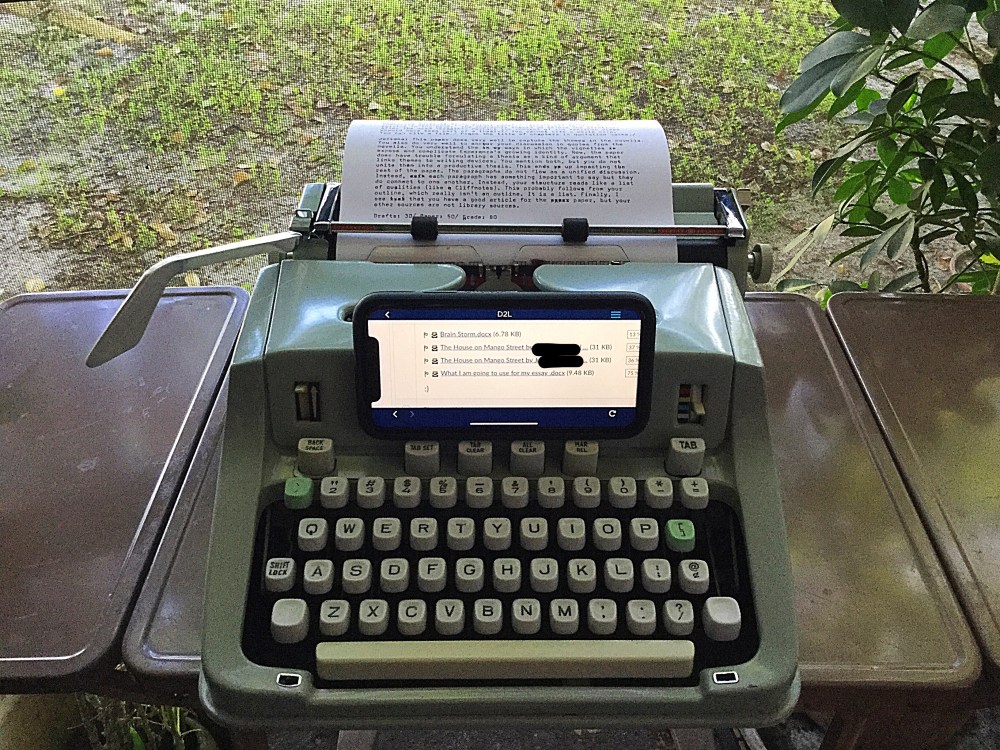
Turnitin is a little glitchy on the iPhone. I sometimes have to turn the phone vertical or horizontal to navigate between D2L and Turnitin. That said, I am able to smoothly read and scroll through papers as I type out responses on a typewriter. I then take a photo of my comments and send it to the student. Work-flow appears promising. One might ask: why I don’t do all of the work digitally? My experience is that grading-software is too often unreliable and it undermines quality feedback. Add to this those horrible moments when servers go down or when software crashes, and my system is much more productive. To the uninitiated, my fusion of smart-tech to typewriter-tech looks time-consuming. The opposite is true: this process is faster and ensures better quality feedback. One more perk is that the novelty of reading feedback on a typed page, even if mediated through an image, grabs the student’s attention. Novelty is important in a world of digital homogeneity. Beyond all of these benefits, typing on a typewriter absorbs and channels attention (as any typospherian will attest). I become more efficient.
I suppose I am more likely to use the iPhone as a hotspot for my iPad, using bluetooth to connect them. An iPad screen is larger. Still, it is nice to have several options at my disposal.
Now take a gander at my Hermes 3000, which I’ve converted into a Dalek. I sure hope this Dalek has a moral compass. If you don’t know what a Dalek is, then please picture my eyes rolling into whiteness. (Believe it or not, the Hermes’ carriage lever actually clears the iPhone.)
In other news: I plan to relocate my D2L assignment explanations (papers and journals) to a blog. D2L presents an astoundingly boring visual layout, and I am convinced many of my Z-Gen students lack the reading stamina to engage that layout. I need more control over visuals, headings, fonts, and formatting. The blog will be for disseminating assignment information. D2L will be for submitting work.
 The Untimely Typewriter:Daily Writings Against the Tides of Distraction
There are definite advantages to having a ‘smart’ phone. Unlike you, I prefer the smallest screen possible. (I miss my iPhone 5s). That was mostly because I carry it on runs in case I run into trouble and to listen to audiobooks.
It is a great pocket scanner too. Scan your typed page to pdf and send to Google docs to edit. I have an app called “Windy” that plays some great back ground for reading or writing.Go to airplane mode and you will be distraction free from the inter webs and Dalek attack.
Ex-termin-ate!
LikeLiked by 1 person
I’ll have to check out Windy. What is your preferred scanning app? I really liked my iPhone SE for its power and small screen, but it went kaput a while ago. I have yet to give the XR the pocket test. I hope it isn’t too inconvenient.
LikeLike
No app necessary. Try this:
LikeLiked by 1 person